
Hidden Traps in Automation: When “Edit” Is Not Really an Edit
Your tests follow the happy path. Your users do not.
This article explains how hidden contexts in NetSuite, Salesforce, and Python create silent failures and how to design automation and custom logic that survive real-world usage. Perfect for teams preparing for go-live.
Most automation and custom logic issues in NetSuite, Salesforce, or Python are not caused by bad logic. They come from missed context.
A script or workflow may work during testing, but real users take different paths. They edit from list views, they import through CSV, or they hit Make Copy. Your automation or scripted logic fires in ways you did not expect, or it silently writes the wrong data.
At Origami Precision, we see these patterns in go-live reviews every month. These are not rookie mistakes. They are natural blind spots that show up when teams build under pressure.
Below are the most common cases and why they matter.
1. NetSuite Edit vs XEdit (Direct List Edit)
Inline edits in list views fire the xedit event, which skips much of the logic in a standard edit.
Your defaulting, validation, or cascading logic may never run.
Example:
A beforeSubmit script recalculates a total when Department changes. It works in form view. A user changes Department inline from a list and the script never fires. Totals drift out of sync.
Practical fix:
Check for context.type === 'xedit' and route logic accordingly.
Keep core calculations in a shared function used by both edit and xedit.
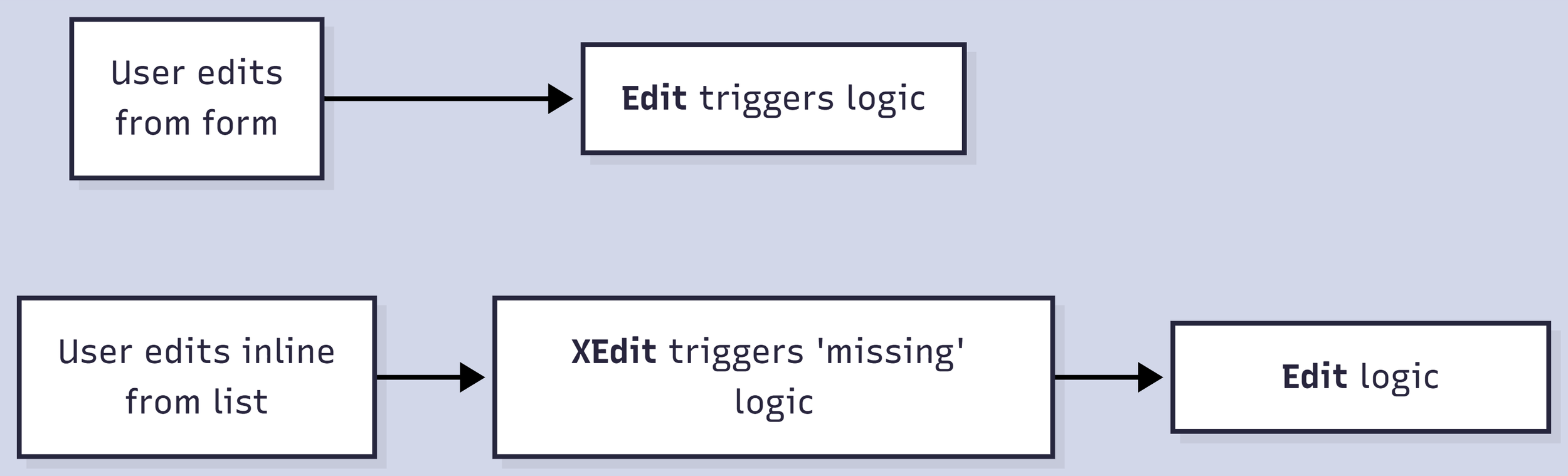
Edit and XEdit paths differ
2. Make Copy
Make Copy duplicates hidden fields unless you clear them.
External IDs, integration flags, payment references, or legacy project fields can travel into the new record.
Practical fix:
Use the copy branch in your User Event.
if (context.type === 'copy') {
  record.setValue({ fieldId: 'externalid', value: '' });
  record.setValue({ fieldId: 'custbody_synced_flag', value: false });
}
Maintain a short shared helper for all fields that should reset on copy.
3. CSV Imports and Integration Context
CSV imports run under the System User. Role-based validation may be skipped.
SuiteTalk updates can trigger edit or xedit depending on the payload.
If your automation or script assumes a real user context, logic can break or skip silently.
Practical fix:
Test through three paths:
Form UI
Inline list edit
CSV or SuiteTalk import
If the current user ID is negative, you are in a system or integration context. Handle that case directly.
4. Salesforce Parallel
In Salesforce the same context issues appear, especially in Apex triggers and Flow-driven automation.
The classic oversight is failing to bulkify triggers.
Developers test with one record. In production, a batch of 200 records arrives through Data Loader or a Flow. SOQL queries inside loops then hit limits and fail.
Practical fix:
Collect IDs, run queries outside loops, and bulk update objects.
Production loads are rarely single-record events.
5. Python Version of Context Blindness
Python’s hidden trap arrives through mutable default arguments.
def add_item(item, items=[]):
    items.append(item)
    return items
Every call shares the same list. Tests may pass. Long-running automation or integration handlers collect leftovers from earlier calls.
Practical fix:
def add_item(item, items=None):
    if items is None:
        items = []
    items.append(item)
    return items
6. Why These Misses Matter
These are not code problems alone. They reveal where testing assumptions do not match real usage.
A stable go-live depends on test scripts that include:
Inline edits
Make Copy
Bulk imports or API updates
User vs system context checks
It is not exciting work. It is the difference between smooth delivery and post-launch firefights.
Takeaway
Precision does not come from clever code. It comes from anticipating all the ways users and systems may interact with that logic.
Before you sign off on automation or scripted behavior, ask:
What happens during list edits
What happens during Make Copy
What happens during CSV or API updates
If you know those answers, you are ahead of most production errors.
At Origami Precision, we help growth-stage SaaS companies build delivery operations that scale without rework. Whether you are working in NetSuite, Salesforce, or Python-based integrations, the goal is always the same: build systems that are precise, predictable, and production ready.